
Search statements
What are search statements
Have you heard of Boolean operators AND, OR and NOT? Why are there quotation marks in a search statement? And what do you do with an asterisk? Next, let's learn how to form search statements!
Search terms are combined into a search statement. A search statement is not an actual sentence, but a search presented in a form understood by the database. You need to be able to tell the database what you want to find: what kind of matches, what concepts can be alternatives, and how accurately the concept should be found.
On Google, we are used to typing a question in the search box, for example. In scientific databases you don't search by typing your topic or question as such in the search box.
As discussed in the previous section Search terms, break down your topic into parts. Come up with synonyms for key concepts. Leave out words like effects and meaning.
- For example, a search statement about the effects of globalization on tourism:
Search terms:
– globalization, globalisation, internationalisation
– tourism, tourists, travel
- Search statement:
(globali* OR internationali*)
AND
(touris* OR travel*)
As another example, a search statement for co-teaching mathematics could be like this:
- ("joint teaching" OR teacher collaboration OR teacher cooperation)
AND
mathematic*
How to create a search statement
The search statement is formed using
- Operators AND and OR. It is good to write them in capital letters. For example pets OR domesticated animals.
- Quotation marks can be used to find exact matches. For example "physical activity".
- A truncation mark can be used to cut a word, so that different forms of the word are included in the search. For example teach* finds teacher, teachers, teaching, teached and so on.
Operators AND and OR
Search terms are broken down for searches. Use operators between search terms.
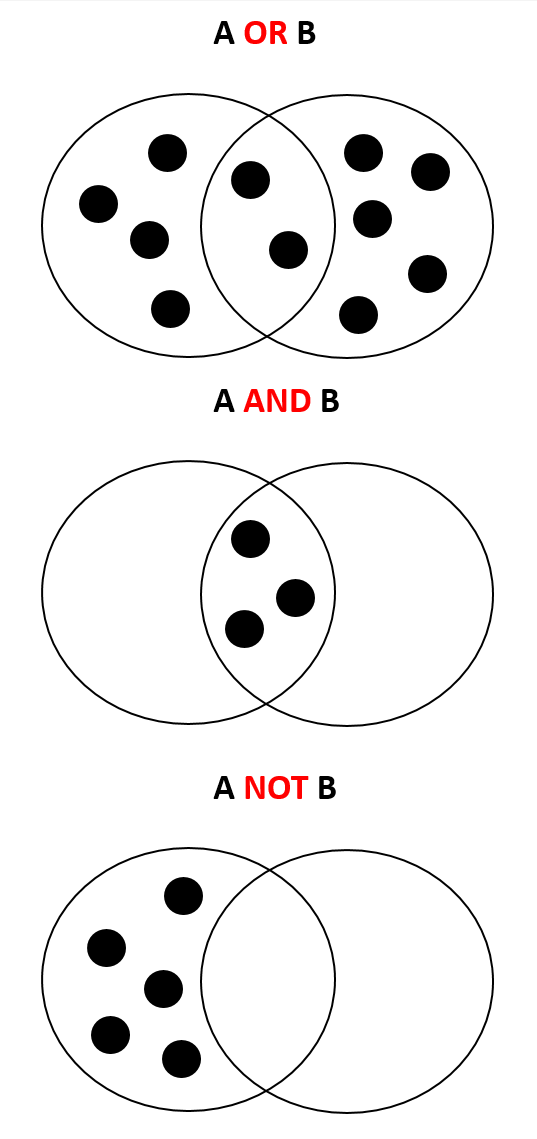
- AND combines
- OR more options
- NOT omitted
For example, the search statement leadership OR management searches for articles that mention either of these words, i.e. leadership or management. So at least one of these words is included in the search results.
- A OR B retrieves references that contain either the search term A or B, or both. For example, the OR operator is used to combine synonyms for words and broader and narrower terms. OR operator increases coverage.
- A AND B retrieves references that contain both the search term A and B. The AND operator is used when, for example, you want to combine two different topics in a search. AND operator increases the accuracy.
- A NOT B retrieves references that contain A but excludes B – also references that contain both A and B are excluded. NOT operator can prohibit the appearance of a term in the search. NOT operator increases the accuracy. Not found in all databases.
Quotation marks
Use quotation marks when you want an exact match. You'll get search results that contain search terms in exactly the order, format, and spelling you typed. Use quotation marks if:
- It is a multi-part established concept, e.g. "climate change" or "early childhood education".
Warning: don't search too precisely! Quotation marks should usually be omitted if:
- The word has different spellings, e.g. well-being or wellbeing
- The word may be inflected in different forms, and the exact wording is not essential, e.g. engage, engagement, engaging
- The same thing could be said differently. Not "police crisis communication", because it could also be crisis communication strategies of police organisations. It would be better to search
police OR "law enforcement"
AND
"crisis communication"
It is usually not necessary to put quotation marks around a single word, although in JYKDOK it can be useful.
Truncation
A so-called wild card search is usually done with an * (asterisk). In place of the asterisk may be a letter or letters in the search results.
E.g. If you search for engag*, you may get hits in the forms engage, engagement, engaging.
Let's search!
Databases usually have an Advanced search option. There are usually two search boxes and they are connected by AND operator. This is a good starting point:
- You can put the first point of view of your topic in one search box and type synonyms in the box one after the other. In the example search, you would put "joint teaching" OR teacher collaboration OR teacher cooperation in the search box.
- In the next box, you can enter another aspect of your topic, the word mathematic* in the example search. And again, you can list synonyms or alternative concepts.
The search box is often followed by a drop-down menu where you can choose where the database looks for matches.
- If you select Abstract, the database searches for articles in which your search terms appear in the abstract.
- It is often a good idea to start with the default settings, such as Anywhere except full text, and narrow down if necessary.

Examples of search statements
- Search statement for outsourcing financial management:
- (”management accounting” OR ”financial administration”)
AND
outsourc*
- (”management accounting” OR ”financial administration”)
- Search statement for advertising in mobile games:
- ("mobile advertising" OR ad targeting OR target* ads OR in-game advertising)
AND
"mobile games"
- ("mobile advertising" OR ad targeting OR target* ads OR in-game advertising)
- Search statement for domestic abuse risk factors:
- ("domestic violence" OR "domestic abuse" OR "intimate partner violence")
AND
("risk factor*" OR "background factor*")
- ("domestic violence" OR "domestic abuse" OR "intimate partner violence")
- Search statement for young employees in early childhood education:
- ("young employee*" OR "recent graduate*" OR "newly graduated" OR "Beginning Worker*" OR "Entry Worker*")
AND
("early childhood education")
- ("young employee*" OR "recent graduate*" OR "newly graduated" OR "Beginning Worker*" OR "Entry Worker*")
Health sciences and search statements
In some fields of science, search statements are formed according to the discipline's own exact practices. As a rule, this is the case in health sciences. See examples.